Report Problems - New Forum Software / Design

Status
Not open for further replies.
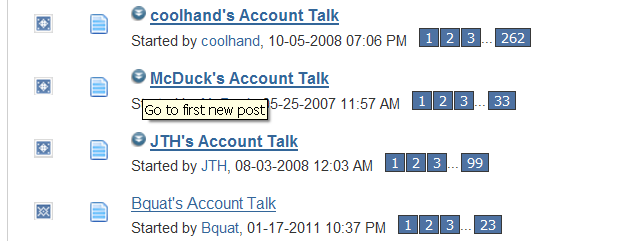
If there is a new post in a thread a clickable icon appears next to that thread that is supposed to take you to the new post...but in reality it takes you to the top of last page where the new post is down below.
 
This icon in the legend on the main forum index isn't working. I didn't check the others...

Contains.png

When I click on the account talk forum there are new posts in there but nothing to indicate that on the index page.

Thanks again for a great site, Tom!
 
Re: Possible Downtime This Weekend

I have noticed that the new "skin' has a pretty small font. I will work on that this week. It's a lot of changes because every area on the forum has its own font size.

For now, try holding down the ctrl-key and hit the + sign on your number pad. It will increase the size of everything on the page.
 
If there is a new post in a thread a clickable icon appears next to that thread that is supposed to take you to the new post...but in reality it takes you to the top of last page where the new post is down below.
The one on the left on the index page in front of the forums? Are you sure it is supposed to take us to the latest thread. I thought it was an info only link to let you know there are new unread posts? I'll have to look into it. I noticed the default style also is not clickable (except to make the threads read).
 
This icon in the legend on the main forum index isn't working. I didn't check the others...

View attachment 13983

When I click on the account talk forum there are new posts in there but nothing to indicate that on the index page.

Thanks again for a great site, Tom!
I will look into that. Thanks.
 
Are the "Karma" buttons working for anyone? I tried to throw a little JTH's way for his new blog, but nothing happened.
It works. I just gave you some rep.

Obviously, JTH didn't deserve any. :laugh:
 
Re: Possible Downtime This Weekend

I have noticed that the new "skin' has a pretty small font. I will work on that this week. It's a lot of changes because every area on the forum has its own font size.

For now, try holding down the ctrl-key and hit the + sign on your number pad. It will increase the size of everything on the page.

Nice! I needed wee-bit bigger font size myself. Learned something new about my keyboard tonight too.
 
This icon in the legend on the main forum index isn't working. I didn't check the others...

View attachment 13983

When I click on the account talk forum there are new posts in there but nothing to indicate that on the index page.

Thanks again for a great site, Tom!

I'm completely out in left field with this one. It's there...it's just so small I wasn't seeing it.
 
The one on the left on the index page in front of the forums? Are you sure it is supposed to take us to the latest thread. I thought it was an info only link to let you know there are new unread posts? I'll have to look into it. I noticed the default style also is not clickable (except to make the threads read).

No. The one to the left of any thread with new posts in it. If you hover over it it says "go to first new post". If you click it it acts like "go to last page"

FNP.png
 
Anybody else having this problem? If I click on "quote" or "new reply" it takes me to the "quick reply" area.
 
Anybody else having this problem? If I click on "quote" or "new reply" it takes me to the "quick reply" area.

Not sure if the is the right process but if I click on the "go advance" button it pops up all the normal reply stuff (icons, font size, font style, etc.).:) An extra step but now I have options.

Tom, thanks for everything. Keep up the good work.
 
Tom,

At the bottom of the Forum page under the banner "What's Going On" where the member names appear, the names extend beyond the border toward the right hand side.

Also under the "TSP Talk Forums Statistics" banner the old version showed most posts by a member (for the day) and the new version does not.
 
Minor detail, but it appears we lose some of our current "friends" if we stick to the default beltway style. any way to fix that?
 
Re: Possible Downtime This Weekend

I have noticed that the new "skin' has a pretty small font. I will work on that this week. It's a lot of changes because every area on the forum has its own font size.

For now, try holding down the ctrl-key and hit the + sign on your number pad. It will increase the size of everything on the page.
it worked..but it enlarges the font on all pages and all sites on the internet..it affects the whole computer..Got to remember to go Control; (-) to return the computer to normal..
 
Status
Not open for further replies.
Back
Top