Report Problems - New Forum Software / Design

Status
Not open for further replies.
Aside from the ongoing Youtube saga in Poolman's thread the site does appear to be snappier, did anyone else notice a difference? I was tied up a bit around the noon deadline, so I didn't get to spin the wheels.
There seems be a marked improvement...tolerable now...
 
Aside from the ongoing Youtube saga in Poolman's thread the site does appear to be snappier, did anyone else notice a difference? I was tied up a bit around the noon deadline, so I didn't get to spin the wheels.

I've got the answer to poolman's thread but he won't listen.

He should start a blog. Inside a blog post only the videos for that day will have to load.

Otherwise, yes. The site does seem faster.
 
I did not see this response from you last night tom.

I just right clicked while in the editor box (this Box).

I don't have a spell check option when I right click.

UPDATE,

I just downloaded IE Spell and now when I right click while in the editor box I have a check spelling option.
I'm Happy now. Sorry if I caused any problems. :)
 
Last edited:
The Board is rippin' today, the upgrade has helped a bunch good job Tom.
 
upgrade is great, but I was in the middle of doing something last night and the next thing I know "come back later, sorry upgrading software". WHAT???:D:D
 
What a difference, I have only had to log in one time this morning. Before the upgrade I usually had to log in again just to make a post.
big_grin.gifbigdance.gifbananadancing2.gif

Well, it made me log in again on this one, but one time is much better!:D
 
I found a fix for the problem of having to sign-in multiple times when posting. This applies to IE9.
Go to:
Tools, Internet Options, Browsing History - Check Delete Browsing History on Exit. Select Settings, under Check for Newer Versions of Stored Pages, Select Every Time I Start Internet Explorer.
That did it for me, so far!:D
 
I found a fix for the problem of having to sign-in multiple times when posting. This applies to IE9.
Go to:
Tools, Internet Options, Browsing History - Check Delete Browsing History on Exit. Select Settings, under Check for Newer Versions of Stored Pages, Select Every Time I Start Internet Explorer.
That did it for me, so far!:D

I might have to try it.
 
Well, it's a little better but didn't solve the problem! It's vB and IE9, what a pain in the rump!:nuts:
There must be some setting that causes it because I use IE9 and have not had the problem at all. I will see if someone has reported this issue with VB.
 
One other person reported what looked like a similar problem and here is their solution / suggestion:

To troubleshoot this, first reupload all the original vB non-image files (except install.php). Make sure you upload these in ASCII format and overwrite the ones on the server. Also be sure to upload the admincp files to whichever directory you have set in your config.php file. Then run 'Suspect File Versions' in Diagnostics to make sure you have all the original files for your version and that none show 'File does not contain expected contents':

Admin CP -> Maintenance -> Diagnostics -> Suspect File Versions

[Note: In some cases you may also need to remove any of the listed .xml files in the includes/xml directory.]

Next, disable all products (except vB Blog, vB CMS and Skimlinks if you have them.)

Admin CP -> Plugins & Products -> Manage Products -> Disable

Then manually uncheck all plugins that are not for 'vBulletin Blog' and vBulletin CMS' here:

Admin CP -> Plugins & Products -> Plugin Manager

You must do BOTH of those steps in order to disable all non vBulletin Modifications.

Then if you still have this problem, create a new style and choose no parent style. This will force it to use the default templates. Finally empty your browser cache, close all browser windows then try again. Make sure you change to the new style and view your forums with it.

Do you have the same problem?

Basically, start the forum from scratch. :suspicious:

So, my suggestion is to play with the cookie / cache settings (or use FireFox or Chrome :D)

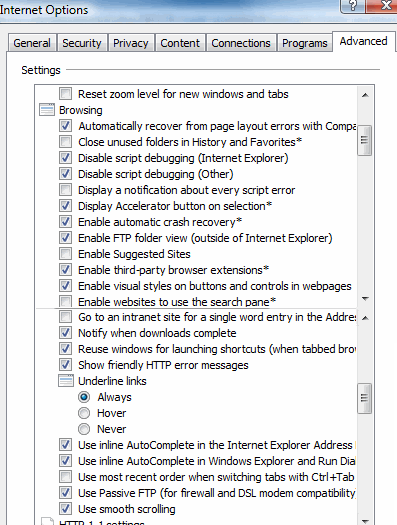
Here are my IE9 Browsing settings in Advanced Internet Options:

080911a.gif
 
OK I reset mine to match yours, only added
'Show friendly HTTP error messages".
BUT I'm trying Compatability mode again, so here goes.
 
That worked so far, now I turned off Compatability modelet's see if it works now?
 
Still working good, you must have fixed it Tom, good deal so far!:D
 
Tom, I've noticed some slow loading this week when going to the Forum link http://www.tsptalk.com/mb/forum.php Not sure what's going on, like just a minute ago it damm near timed out. Did you notice we broke a new record this month with members online?
 
Tom, I've noticed some slow loading this week when going to the Forum link http://www.tsptalk.com/mb/forum.php Not sure what's going on, like just a minute ago it damm near timed out. Did you notice we broke a new record this month with members online?
I did see that (new record). I guess market panic gets a few more folks interested in what is going on.

I didn't notice they slow down but I wasn't online for the last few hours. I'll monitor it. Thanks.
 
Status
Not open for further replies.
Back
Top