New "Like" Feature Installed - Poll

Where would you like to see the "Like" icon / button?

  • On existing icon row

    Votes: 9 37.5%
  • On the right on its own row

    Votes: 6 25.0%
  • Don't care

    Votes: 9 37.5%

  • Total voters
    24
  • Poll closed .
Try by scrolling to the very bottom of the vbulletin skin and tap on full site. It worked last year on the more sophisticated iOS mobiles. An apple a day, keeps the bugs away. :laugh:

that doesn't work anymore kk. that is how i used to access the full site prior to last week's fix. besides, i prefer peaches.
 
If it's not working for you, can you please post your computer OS...

Mac, PC, mobile (we know that doesn't work), etc...

Thanks!

It works on my iPad, but not the iPhone. I'll try the Mac home computer tonight after I get home from work. I use Safari on all 3 devices.
 
If it's not working for you, can you please post your computer OS...

Mac, PC, mobile (we know that doesn't work), etc...
Thanks for the info. Let me try narrow down the problems a little more.

If it's not working for you, Are you logged in, and can you please post your computer / OS...

i.e.: Mac / iO, PC / windows, mobile (we know that doesn't work), etc., And...


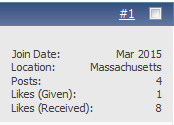
1) Can you see yours and others' Like counts?...

042415d.gif


2) Can see you a tab in your Profile like this... (Here's how to get to your profile - user your username...http://www.tsptalk.com/mb/members/your_username.html)

042415e.gif


3) Can you see the Like icon?

042415c.gif


I have checked Explorer, Firefox, and Chrome on a PC (Windows 8 and Vista) and it seems to be working, so it is potentially a setting in your browser, but I will try to find out why. You do have to be signed in to view these.

Thanks!
 
.

If it's not working for you, Are you logged in, and can you please post your computer / OS...

1) Can you see yours and others' Like counts?...

042415d.gif


2) Can see you a tab in your Profile like this... (Here's how to get to your profile - user your username...http://www.tsptalk.com/mb/members/your_username.html)

042415e.gif


3) Can you see the Like icon?

042415c.gif


I have checked Explorer, Firefox, and Chrome on a PC (Windows 8 and Vista) and it seems to be working, so it is potentially a setting in your browser, but I will try to find out why. You do have to be signed in to view these.

Thanks!

OK, I'm logged in, can't see anyone's like counts, my profile does not have the tab in question. Win7, Firefox
 
OK, I'm logged in, can't see anyone's like counts, my profile does not have the tab in question. Win7, Firefox

I have 2 computers to test on this site, one running Win7 and one running Win8, both using Firefox and I can see all as I think intended ... "Likes" counts on right top (under #posts) and "Like this Post" on right bottom. It may not be an OS issue? Just trying to help.
 
1) No

2) No

3) No

Logged out, logged in - no change

Changed color scheme, changed back - no change

Made changes to my profile (general settings) - No change

Its not "Like"-ing me... Must be a progressive "add-on" ;)
 
Last edited:
1) No

2) No

3) No

Logged out, logged in - no change

Changed color scheme, changed back - no change

Made changes to my profile (general settings) - No change

Its not "Like"-ing me... Must be a progressive "add-on" ;)

OK, I'm logged in, can't see anyone's like counts, my profile does not have the tab in question. Win7, Firefox

Win8.1 w/ Chrome on PC

Also, not working on same PC laptop and Win8.1 w/ IE

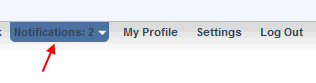
Curious if you guys can see your Like count in your Notifications tab at the top of the forum? If you've clicked it once it goes back to -0-, but if you haven't looked in your profile, the count of all of the Likes should show there because of the rollover. It should be close to the total of all your old likes.
042415f.gif


Also, any chance of a PC restart?
 
Restart! what a concept. doing it now. If that doesn't work, I'll still be likeless.
 
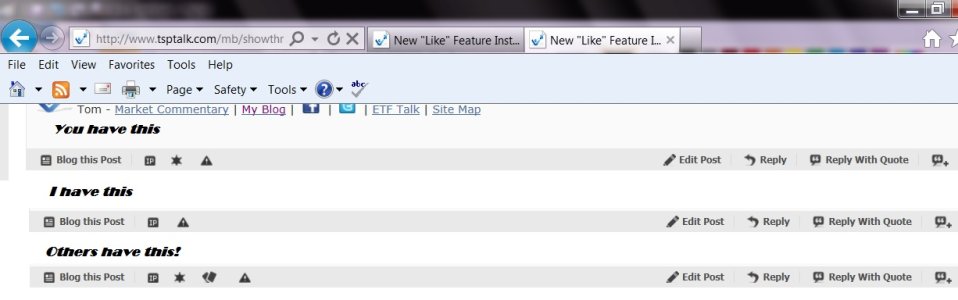
Tom it isn't working for me but I noticed something strange. Disregard the trash at the top of the JPEG.
Likes.jpg
 
Some of those features you can't do to your own posts, like add to reputation (sheriff's badge) / give infraction (cards), etc., so they don't show.
I see said the blind man to the deaf mute.
 
OK, thanks. I'll dig deeper.

I'm going to like that last post... maybe it will open the floodgates??
 
I've installed the new "Like" feature and imported the old Likes into it. The new one is slightly different so let me ask what you like better.

Would you - 1- rather see the like icon/button on the same line as the other icons?

042415b.gif

.
.
.

Or - 2 - would you prefer it be on the right side on its own line below the posts? (more visible but takes up more space.)

042415c.gif


.
.
.
---------------------------------
Oh, and the likes given / received will now be on the right side of your profile header above each post ...

042415d.gif


Tom, thanks for your hard work in listening to the customers and reinstalling the "like" feature.
You do know that your posting is about to be bombarded with "likes" :banana:

As for preferences, my own opinion is that while more visible is better, we will all quickly know where the feature is, so in short order it won't matter.
So in saving space, choice 1 should be fine.
 
OK, thanks. I'll dig deeper.

I'm going to like that last post... maybe it will open the floodgates??

Sorry Tom, I took a break to run into town, do a couple errands. As far as floodgates, I wish. It didn't. I've gone through my browser settings, can't see anything that would block. went through my forum settings as well. I don't see anything that might fix the problem from my end. could it have anything to do with the fact that I don't maintain a facebook account? My antivirus software isn't warning me about blocking anything..
 
could it have anything to do with the fact that I don't maintain a facebook account? My antivirus software isn't warning me about blocking anything..

I don't think it's related to facebook, but who knows? I'm looking at all options. It's just weird that some folks have no problems and others looks at 3 PC and have the issue on all of them.

I wonder if those who have the Like issue are the ones having the post link issue? But I'm sure it's not because you are unlikable. :laugh:
 
Back
Top