New "Like" Feature Installed - Poll

Where would you like to see the "Like" icon / button?

  • On existing icon row

    Votes: 9 37.5%
  • On the right on its own row

    Votes: 6 25.0%
  • Don't care

    Votes: 9 37.5%

  • Total voters
    24
  • Poll closed .

tsptalk

Administrator
Staff member
Reaction score
2,449
I've installed the new "Like" feature and imported the old Likes into it. The new one is slightly different so let me ask what you like better.

Would you - 1- rather see the like icon/button on the same line as the other icons?

042415b.gif

.
.
.

Or - 2 - would you prefer it be on the right side on its own line below the posts? (more visible but takes up more space.)

042415c.gif


.
.
.
---------------------------------
Oh, and the likes given / received will now be on the right side of your profile header above each post ...
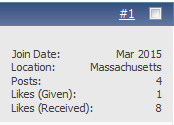
042415d.gif
 
How will I ever get through all these notifications? :laugh: :D
 

Attachments

  • Screen Shot 2015-04-24 at 9.33.13 PM.png
    Screen Shot 2015-04-24 at 9.33.13 PM.png
    12.2 KB · Views: 82
Hello! I need to read with my glasses on. Skip my last post. :embarrest:
 
Last edited:
no like on the vbulletin mobile skin either. nor can i access the settings function or post attachments/images except for 'full site' on a normal computer.

has anybody with an android smart phone figured out how to view the forums in normal regular browser mode instead of the simplified mobile device version i am stuck in since last week's upgrade?
 
No it doesn't look like it has, maybe Tom want's more votes on the position of the "LIKE"?

Thank you. Voted that it matters not to me, Tom knows best! I'll like anything he decides. But, I find it very polite and respectful that he wants our opinion. :smile:

Frank
 
No like on the tapatalk app :(


Sent from my (Daughter forcing me to use an) iPhone using Tapatalk...

I found this from the folks who created this Like feature regarding mobile...

Two reasons:
1. Mobile styles are designed to be extremely minimalistic and lightweight, so anything we add to it is going to negatively impact the browsing experience for people browsing via mobile-specific styles.

2. Mobile styles, by design, do not have the same template hooks as the "full" styles

3. The HTML is significantly different, meaning we would need to re-code large portions of JavaScript-heavy mods like APTL and vBShout, for something only a small subset of our users would benefit from

I understand that mobile support is extremely important to you, but please also understand that for a lot of forums, mobile support is entirely irrelevant. If we have a choice between working on something that, let's be generous and say 75% of our users could benefit from (the actual number is way, way lower), or something that 100% of our users could benefit from, it's nearly impossible to justify spending time working on anything but the latter
smile.png
 
Has this been implemented yet? It's currently not visible to me.

Frank

Yeah, it is installed and working... but we just found out it does not work with the mobile apps (see prior posts) - if that's where you are viewing this?
 
no like on the vbulletin mobile skin either. nor can i access the settings function or post attachments/images except for 'full site' on a normal computer.

has anybody with an android smart phone figured out how to view the forums in normal regular browser mode instead of the simplified mobile device version i am stuck in since last week's upgrade?

Try by scrolling to the very bottom of the vbulletin skin and tap on full site. It worked last year on the more sophisticated iOS mobiles. An apple a day, keeps the bugs away. :laugh:
 
If it's not working for you, can you please post your computer OS...

Mac, PC, mobile (we know that doesn't work), etc...

Thanks!
 
Back
Top
